Buy now. Pay later.
Pay in 4 interest-free payments of
R 110.00
with Payflex.
Share
The PIX-LINK LV-WR59Q WiFi Range Extender is a versatile wireless networking solution designed to improve WiFi coverage and eliminate dead zones in your home or office. Whether you're streaming videos, attending online meetings, gaming or browsing the web, the LV-WR59Q helps extend your existing wireless network for a more stable and reliable connection.
Featuring a simple plug-and-play setup process, users can quickly configure the device without advanced networking knowledge. The extender amplifies your existing router's signal to improve wireless coverage in areas where WiFi reception is weak or inconsistent.
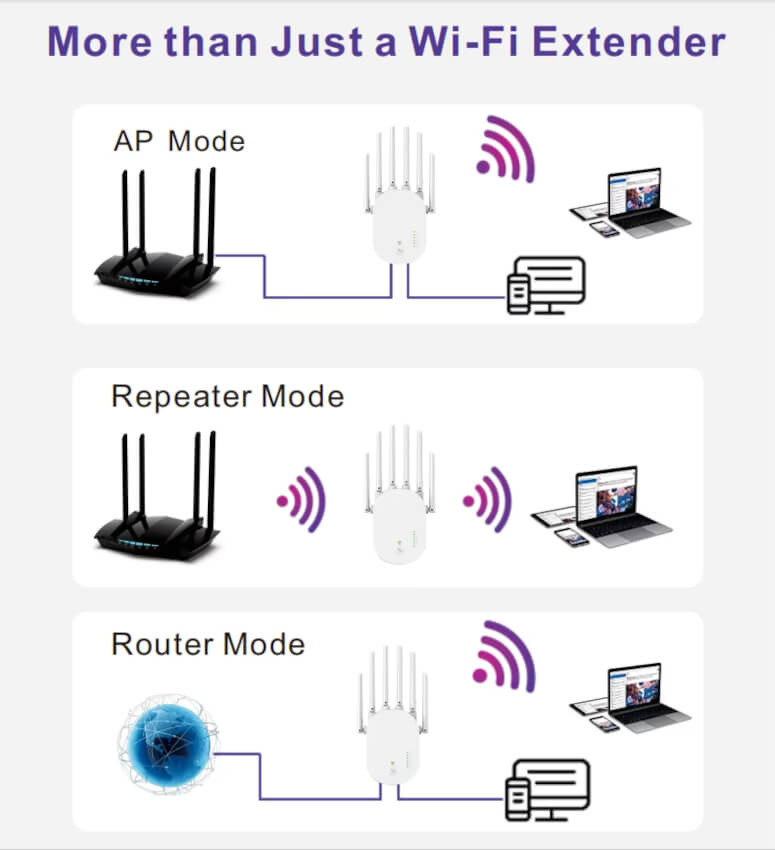
The LV-WR59Q supports multiple operating modes including Repeater Mode, Access Point Mode, Router Mode and WISP Mode, providing flexibility for a variety of networking environments. An integrated Ethernet port also allows wired devices to connect to your network for improved stability.
Key Features
Extends existing WiFi coverage throughout your home
Helps eliminate wireless dead zones
Easy plug-and-play installation
Integrated Ethernet port for wired connections
Supports Repeater, Router, AP and WISP modes
Compatible with most wireless routers
Suitable for streaming, gaming and remote work
Compact wall-plug design
Wireless Modes
Repeater Mode: Extends existing WiFi coverage
Access Point Mode: Creates a wireless network from a wired connection
Router Mode: Functions as a standalone wireless router
WISP Mode: Connects to a wireless ISP network
Ideal For
Homes with weak WiFi coverage
Multi-room wireless networks
Home offices
Online gaming
Video streaming
Remote work and online learning
Connecting wired devices via Ethernet
Compatibility
The PIX-LINK LV-WR59Q is compatible with most standard wireless routers and networking equipment supporting IEEE 802.11b, 802.11g and 802.11n wireless standards.
Specifications
Brand: PIX-LINK
Model: LV-WR59Q
Wireless Standards: IEEE 802.11b/g/n
Frequency Band: 2.4GHz
Wireless Modes: Repeater, AP, Router and WISP
Wireless Security: WPA-PSK / WPA2-PSK
Ethernet Port: RJ45 LAN Port
Maximum Transmission Power: <20dBm
Operating Temperature: 0°C to 40°C
Storage Temperature: -40°C to 70°C
Operating Humidity: 10% to 90% Non-Condensing
Storage Humidity: 5% to 90% Non-Condensing
What's In The Box
1 × PIX-LINK LV-WR59Q Wireless Repeater
1 × RJ45 Network Cable
1 × Quick Installation Guide
Frequently Asked Questions
What does a WiFi repeater do?
A WiFi repeater extends the coverage of your existing wireless network, helping eliminate weak signal areas.
Can I use it with any router?
Yes, it is compatible with most standard wireless routers supporting 2.4GHz WiFi networks.
Does it have an Ethernet port?
Yes, the device includes an RJ45 Ethernet port for connecting wired devices.
Can it be used as an access point?
Yes, it supports Access Point (AP) Mode in addition to Repeater, Router and WISP modes.
Is setup difficult?
No, the LV-WR59Q features a simple setup process designed for home users.
The PIX-LINK LV-WR59Q WiFi Range Extender is an affordable and practical solution for improving wireless coverage, enhancing connectivity and creating a more reliable network throughout your home or office.
Please Note: Actual wireless performance and coverage may vary depending on building materials, router placement, interference and environmental conditions.
Choosing a selection results in a full page refresh.
Opens in a new window.
Earn {points} points with this purchase
Join free to see all benefits
Derrick Kulu
Perfect
Perfect, I can move around with it, so handy.
GENIUS KEYBOARD WIRELESS 7230 SLIMSTAR
Graham Dorney
Top service
Top service. Well priced
Microsoft 365 Personal 1 Year Subscription QQ200007
Dini Smit
Great
Great product
GeIL Orion 16GB 6000MHz RGB DDR5 RAM - Grey
Anonymous
No issue ram working good I'm happy with the product and was fast delivery
No issue ram working good I'm happy with the product and was fast delivery.
ADATA 16GB DDR4 PC-3200 U-DIMM
Andre & Yolandi
100 % We orderd a 12 month subscription package
100 % We orderd a 12 month subscription package,
Microsoft 365 for 6 people from Matrix online and are very satisfied with our purchase,payment was quick and got it on e- mail straight after payment. Easy and convenient , you can give them a try and see 4 yourself they are awsum. Matrix Carnavil Mall. Thanx guys.
Microsoft 365 Family (6GQ-00087) – 12-Month Digital License for Up to 6 People